
Zip Extractor — Unzip Files1.9 - App Store
You'll be able to see results in few seconds.
Publisher Description

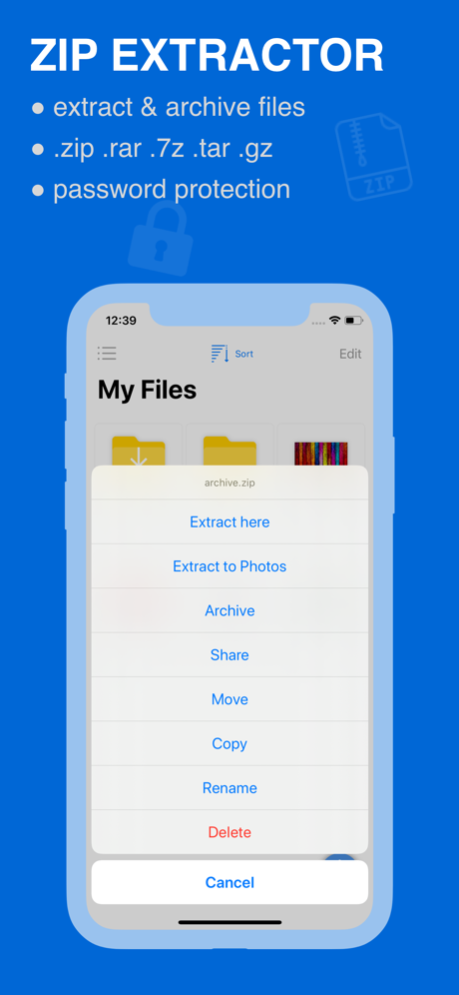

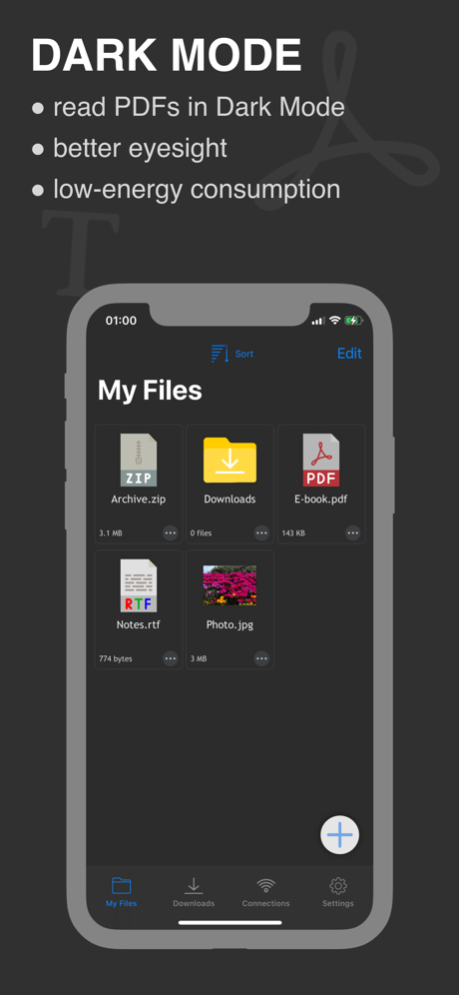
Zip & unzip RAR files easily
Zip & unzip (extract) Zip/Rar/7z files quickly and efficiently. It's a fast and secured zip extractor and archiver tool for iOS.
If you are looking for a zip extractor & 7z archiver or RAR extractor and archiver app for your Apple device that allows you to zip and unzip any RAR or Zip file fast and smoothly - this app is for you. It's a zip tool that requires very few actions, and anyone can use this without any complication or trouble whatsoever.
>>> key Features of this Zip App:
# Copy and open files downloaded from Internet or received from AirDrop, Email or shared from another app:
No matter what kind of zip or RAR or 7z files you get from the internet or AirDrop, or email this zip opener tool will open the files smoothly. Even if the file is shared from another app, this zip&rar - zip file opener will extract the files perfectly.
# Extract files including photos and Save into Camera Roll directly:
This zip file reader lets you extract photos and saves them directly to your Camera Roll folder. You won't have to go through folder to folder to find where this zip app has saved the photos. They won't get mixed with other files making it difficult for you to cherry-pick
# Select multiple photos and videos, and Save into Camera Roll
This zip & RAR file extractor also have a great feature that lets you select multiple photos and videos from different locations and lets you save them into your Camera Roll folder, which gives you the convenience of categorizing same kind of photos and videos and find them when you need them easily.
# Extract files from ZIP format, including password protected files
Many times, you download zip files the contents of which are really important to you. However, when you try to unzip or extract them, you find that they are password protected - talk about disappointment! Well, no more disappointments if you have this zip opener app in your phone. This zip tool will extract the password protected files like it's nothing.
# Extract files from RAR format
Win RAR is one of the most common zip file formats. If you see a file that features ".rar" instead of ".zip", don't be concerned at all. If you have this app, it will work as a RAR extractor as well, and open any Rar file you want to "unrar." You don't need a separate RAR Opener app to do the job.
# Compress multiple files into ZIP file, with password protection option
Are you on the look for a zip file compression app that compresses multiple files into one zip file? - Well, this is not only a zip & RAR file extractor, it will compress any collection of files into one zip file.
# Add photos and videos from Camera Roll and Compress
This Zip & RAR file extractor free app lets you directly go into the Camera Roll folder and select multiple photos and videos to be compressed into one zip file.
# Download files and folders from Google Drive and Dropbox into app, and manage them as you wish
# Open and view many document types: PDF, TXT, JPG, PNG, videos etc.
Apart from compress and unzip files, this zip archiver- rar zip file tool will let you open and view a number of file types such as, PDF, TXT, JPG, PNG, and Videos. You don't have to go to a separate app every time you extract files of the mentioned formats. This feature will especially become a lifesaver when you are on a rush and time is of the essence.
# Support multiple ways of sharing files, including: Email, Message, Airdrop, Open in another App
With its simple interfaces, it provides the easiest way to manage ZIP and RAR and many other files on iPhone and iPad. If you want a perfect, full-featured, secured, and efficient Zip & rar file extractor app for free - download and install this app and be amazed by it's simplicity and efficiency.
◆ Terms ◆
Terms: http://zeytechnology.com/terms.html
Privacy policy: http://zeytechnology.com/privacy.html
Contact: support@zeytechnology.com
Dec 12, 2022
Version 1.9
Bugs fixes and performance improvements
About Zip Extractor — Unzip Files
The company that develops Zip Extractor — Unzip Files is Zeytech Yazilim. The latest version released by its developer is 1.9.
To install Zip Extractor — Unzip Files on your iOS device, just click the green Continue To App button above to start the installation process. The app is listed on our website since 2022-12-12 and was downloaded 0 times. We have already checked if the download link is safe, however for your own protection we recommend that you scan the downloaded app with your antivirus. Your antivirus may detect the Zip Extractor — Unzip Files as malware if the download link is broken.
How to install Zip Extractor — Unzip Files on your iOS device:
- Click on the Continue To App button on our website. This will redirect you to the App Store.
- Once the Zip Extractor — Unzip Files is shown in the iTunes listing of your iOS device, you can start its download and installation. Tap on the GET button to the right of the app to start downloading it.
- If you are not logged-in the iOS appstore app, you'll be prompted for your your Apple ID and/or password.
- After Zip Extractor — Unzip Files is downloaded, you'll see an INSTALL button to the right. Tap on it to start the actual installation of the iOS app.
- Once installation is finished you can tap on the OPEN button to start it. Its icon will also be added to your device home screen.
Program Details
System requirements
Download information
Pricing
Version History
version 1.9
posted on 2022-12-12
Dec 12, 2022
Version 1.9
Bugs fixes and performance improvements
version 1.8
posted on 2022-05-11
May 11, 2022 Version 1.8
Bugs fixes and performance improvements
version 1.7
posted on 2022-04-05
Apr 5, 2022 Version 1.7
Bugs fixes and performance improvements
version 1.6
posted on 2021-12-29
Dec 29, 2021 Version 1.6
Bugs fixes and performance improvements
version 1.5.1
posted on 2021-09-30
Sep 30, 2021 Version 1.5.1
Bugs fixes and performance improvements
Disclaimer
Official App Store Link
We do not host Zip Extractor — Unzip Files on our servers. We did not scan it for viruses, adware, spyware or other type of malware. This app is hosted by Apple and passed their terms and conditions to be listed there. We recommend caution when installing it.
The App Store link for Zip Extractor — Unzip Files is provided to you by apps112.com without any warranties, representations or guarantees of any kind, so access it at your own risk.
If you have questions regarding this particular app contact the publisher directly. For questions about the functionalities of apps112.com contact us.
